Short-Term Copier Leasing: Flexible Rental Options for Every Business (2026 Guide)

March 20, 2026
 1654 views
 0 comments
Short-Term Copier Leasing
Short-Term Copier Leasing: Flexible Rental Options for Every Business (2026 Guide)
How to Rent Copiers for Days, Weeks, or Months Without Long-Term Contracts
The Basics
What Is Short-Term Copier Leasing?
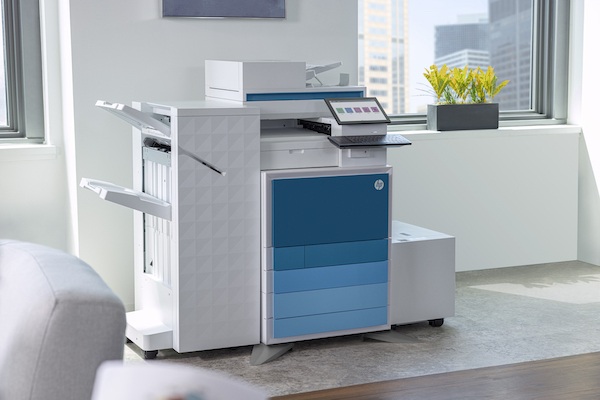
Short-term copier leasing is exactly what it sounds like: you rent a copier or multifunction printer (MFP) for a set period, usually anywhere from a single day up to twelve months. And unlike traditional copier leases locking you in for three to five years, short-term rentals give you the freedom to scale equipment up or down based on actual demand.
Think of it this way. Your Daytona Beach office lands a massive contract doubling your print volume overnight. Or you are opening a temporary project office in Orlando for six months. Maybe your primary copier broke down and the replacement parts are on backorder. In each of these situations, buying a new copier makes zero financial sense.
Short-term rentals bridge the gap. They give your team reliable printing, copying, and scanning capacity without the capital outlay or contractual baggage of a full lease. Most rental agreements include delivery, setup, and basic maintenance; so you are productive from day one.
Why It Matters
Why Florida Businesses Are Choosing Short-Term Copier Rentals
The managed print services market hit an estimated $53.5 billion globally in 2026, and a growing slice of the market is short-term and flexible rental agreements. Why? Because the way businesses operate has changed. Hybrid work, project-based teams, and seasonal demand cycles all make fixed five-year copier leases feel outdated.
Here in Central Florida, we see this play out every week at Smart Technologies. Event planners in Daytona Beach need production copiers for a weekend conference. Construction firms in Orlando need temporary document management during a six-month build phase. Law offices need a backup MFP while their primary unit is serviced.
The common thread? None of these businesses want to own or lease a copier for years. They want reliable equipment, fast delivery, and a clear exit date.
Global managed print services market value in 2026, with short-term rentals growing as a key segment (Source: The Business Research Company)
Cost Breakdown
How Much Does Short-Term Copier Leasing Cost in 2026?
Let’s talk numbers. Pricing depends on the machine class, rental duration, print volume, and whether color printing is included. But here is a realistic snapshot of what Florida businesses are paying right now:
| Copier Class | Monthly Rental | Best For | B&W Cost Per Page | Color Cost Per Page |
|---|---|---|---|---|
| Desktop MFP (low volume) | $99 – $175 | Small offices, temp setups | $0.01 – $0.015 | $0.08 – $0.12 |
| Mid-Range MFP (25-45 ppm) | $175 – $350 | General office, project teams | $0.01 – $0.012 | $0.06 – $0.09 |
| Production MFP (45-75 ppm) | $350 – $600+ | Events, high-volume projects | $0.008 – $0.01 | $0.04 – $0.07 |
| Wide-Format Printer | $250 – $500 | Architecture, construction | Varies by sq ft | Varies by sq ft |
A few things to keep in mind. Short-term rentals carry higher monthly rates than standard 36- to 60-month leases because the provider absorbs more risk in a shorter payback window. A mid-range MFP costing $175 per month on a five-year lease might run $275 to $350 per month on a three-month rental. The premium buys you flexibility, and for most temporary situations, the math still works out in your favor.
Also, ask about bundled service. Many providers (Smart Technologies included) bundle toner, maintenance, and support into the monthly rate. Others charge per page on top of the base rental. Make sure you understand the total cost before signing.
Comparison
Short-Term Rental vs. Long-Term Lease vs. Buying: Which Makes Sense?
This is the question every office manager asks. And the honest answer is: it depends on your timeline, budget, and print volume. Here is a side-by-side comparison to help you decide:
| Factor | Short-Term Rental | Long-Term Lease (36-60 mo) | Purchase |
|---|---|---|---|
| Upfront Cost | $0 – $250 deposit | $0 – $500 deposit | $3,000 – $25,000+ |
| Monthly Cost | $99 – $600+ | $75 – $450 | $0 (after purchase) |
| Contract Length | 1 day – 12 months | 36 – 60 months | None |
| Maintenance Included | Usually yes | Often bundled | You pay separately |
| Technology Updates | Swap anytime | At renewal | Buy new unit |
| Tax Treatment | Operating expense | Operating expense | Depreciation over 5-7 yrs |
| Best For | Events, temp offices, backup | Established offices | Very high volume, long horizon |
So what is the honest caveat here? If you know you will need a copier for more than 18 months, a traditional lease almost always saves money. Short-term rentals are a premium product designed for flexibility. They shine when your timeline is measured in days, weeks, or a few months.
But if you need equipment tomorrow and your only alternative is an emergency purchase at retail price, a short-term rental will save your business thousands.
Use Cases
11 Scenarios Where Short-Term Copier Leasing Makes Sense
Not sure if a short-term rental fits your situation? Here are the most common use cases we see at Smart Technologies of Florida:
- Event support: Conferences, trade shows, and corporate retreats in Daytona Beach or Orlando that need on-site document printing for attendees and organizers.
- Office relocations: Your team moves to a new space and the permanent copier will not arrive for three weeks. A rental keeps workflows intact during the transition.
- Seasonal demand spikes: Tax season for accounting firms, enrollment periods for schools, or holiday rushes for retailers all create temporary surges in print volume.
- Construction and project offices: Temporary job-site trailers need printing and scanning for blueprints, permits, and daily reports.
- Equipment breakdowns: Your primary copier is down and the repair tech says parts will take two weeks. Every hour without a working copier costs productivity.
- Startup validation: You just launched a business and want to test your print needs before committing to a multi-year lease.
- Disaster recovery: After a flood, fire, or hurricane (not uncommon in Florida), a rental copier gets you back to operational status quickly.
- Legal proceedings: Depositions, trials, and large document productions often demand high-volume printing capacity that your standard office copier cannot handle.
- Healthcare facility expansions: Temporary clinics or expanded patient intake areas need document management for intake forms, prescriptions, and records.
- Nonprofit fundraising campaigns: Galas, auctions, and capital drives generate a burst of printing needs for invitations, programs, and donor materials.
- School and university events: Graduations, orientations, and testing periods require extra printing capacity that the permanent fleet cannot absorb.
Hidden Costs
Watch Out for These Hidden Fees in Short-Term Copier Rentals
Here is where things get tricky. Not every rental provider is transparent about pricing. Before you sign, ask specifically about these potential charges:
- Delivery and pickup fees: Some providers include this; others charge $100 to $300 per trip. For Central Florida rentals, Smart Technologies includes local delivery within our service area at no extra charge.
- Overage charges: If your rental includes a set number of pages per month (say 5,000 black-and-white prints), every page beyond that threshold gets billed at $0.02 to $0.05 per page. That adds up fast.
- Security deposits: Expect $200 to $500 depending on the machine value. Make sure the contract clearly states when and how you get it back.
- Early termination penalties: Even on short-term agreements, some providers penalize you for ending the rental early. Read the fine print.
- Insurance requirements: Certain providers require you to carry liability insurance on the equipment. Others self-insure but charge a small monthly premium ($15 to $40).
- Consumables: Toner and paper may or may not be included. A bundled service contract typically covers toner and staples; paper is almost always your responsibility.
- Network setup fees: Connecting the copier to your office network, setting up scan-to-email, or configuring print drivers might incur a one-time IT setup charge of $75 to $150.
The best way to avoid surprises? Request an all-inclusive quote that spells out every cost line by line. And do not hesitate to negotiate. Rental pricing is rarely fixed in stone.
Average hourly cost of IT equipment downtime for small businesses in 2025, underscoring the urgency of fast copier replacement (Source: CloudSecureTech)
Rental Agreements
What to Look for in a Short-Term Copier Rental Agreement
A rental agreement is a binding contract, even if it only covers 30 days. Before you sign, verify these key elements:
Duration and Renewal Terms
Confirm the exact start and end dates. Does the contract auto-renew to month-to-month after the initial term? Some providers continue billing until you send a formal cancellation notice, so clarify the exit process upfront.
Maintenance and Support Scope
Who handles repairs? What is the guaranteed response time? For business-critical equipment, you want a provider that offers same-day or next-business-day on-site service. Smart Technologies of Florida provides on-site support across the Daytona Beach, Orlando, and Jacksonville metro areas with a four-hour response target.
Equipment Specifications
Make sure the agreement lists the exact make, model, and capabilities of the copier you are renting. Confirm print speed (pages per minute), color capability, paper tray capacity, and finishing options like stapling and hole-punching. You do not want a 20-ppm desktop unit showing up when your project needs a 55-ppm production machine.
Liability and Damage Provisions
Understand who is responsible for accidental damage. Most rental agreements hold you liable for anything beyond normal wear and tear. Ask about damage waivers or insurance add-ons if your environment carries higher risk (construction sites, warehouses, outdoor events).
Data Security
Modern copiers have internal hard drives that store images of every document scanned or printed. When the rental ends, confirm that the provider will wipe or destroy the hard drive. This is critical for industries handling sensitive data: legal, healthcare, finance, and government. The National Institute of Standards and Technology (NIST) recommends formal data sanitization procedures for all end-of-life office equipment.
Technology
Features to Prioritize in a Short-Term Copier Rental
Not all copiers are created equal. When renting for a specific project or event, match the machine features to your actual workflow:
- Print speed: For general office use, 25 to 35 pages per minute is sufficient. Events and high-volume projects need 45 ppm or faster.
- Color vs. monochrome: Color copiers cost 30% to 60% more per month. If your project only requires black-and-white documents, save the budget and rent monochrome.
- Scan-to-email and scan-to-cloud: Essential for modern workflows. Make sure the rental unit supports scanning directly to email, Google Drive, OneDrive, or your document management system.
- Duplex printing: Automatic two-sided printing cuts paper usage in half. Almost every mid-range and production MFP includes this, but confirm before signing.
- Mobile printing support: Teams increasingly print from smartphones and tablets. Look for AirPrint, Mopria, or manufacturer-specific mobile apps.
- Finishing options: Stapling, hole-punching, saddle-stitch booklet making, and folding can save hours of manual assembly during large print runs.
- Security features: User authentication, encrypted printing, and secure print release protect sensitive documents. The Cybersecurity and Infrastructure Security Agency (CISA) classifies networked printers as potential attack vectors, so security features matter even on rental units.
And here is a practical tip: ask your rental provider for a demonstration or a spec sheet before delivery. Five minutes of upfront verification saves hours of frustration during your rental period.
How We Help
How Smart Technologies Helps Florida Businesses with Short-Term Copier Needs
At Smart Technologies of Florida, we have supported businesses across the state with copier solutions since 1999. Our short-term rental program is built around three principles: speed, flexibility, and transparent pricing.
We carry equipment from leading manufacturers including Ricoh, Xerox, and HP. Whether you need a single desktop MFP for a pop-up office or five production copiers for a statewide conference, we can build a rental package that fits your timeline and budget.
Step by Step
How to Set Up a Short-Term Copier Rental in 5 Steps
Ready to get started? Here is the process from first call to final pickup:
Step 1: Define Your Requirements
Before contacting a rental provider, document your needs. How many pages per day will you print? Do you need color? What finishing features matter? How long do you need the equipment? Having clear answers speeds up the quoting process significantly.
Step 2: Request All-Inclusive Quotes
Contact two or three providers and request itemized quotes. Compare the base rental rate, per-page charges, delivery fees, and support scope. A provider who bundles everything into one monthly number is usually easier to budget around than one who nickels-and-dimes on consumables.
Step 3: Review the Agreement
Read every line of the rental contract. Pay special attention to auto-renewal clauses, damage liability, and the return process. If anything is unclear, ask before signing. A good provider will walk you through the contract without pressure.
Step 4: Schedule Delivery and Setup
Coordinate delivery timing with your IT team (or the provider’s technicians). Make sure your network is ready: an active Ethernet port, a static IP address if required, and admin credentials for adding the printer to your print server or cloud environment.
Step 5: Return or Extend
When the rental period ends, the provider picks up the equipment. If your project runs longer than expected, most providers (Smart Technologies included) allow you to extend month-to-month. Just give advance notice before the end date.
Frequently Asked Questions
Short-Term Copier Leasing FAQ
Can I rent a copier for just one day?
Yes. Many rental providers offer daily rates for events, conferences, and emergency situations. Daily rentals typically cost more per day than weekly or monthly agreements, but they give you maximum flexibility for very short needs. In Central Florida, Smart Technologies can arrange same-day or next-day delivery for urgent requests.
What is the difference between leasing and renting a copier?
Leasing involves a long-term contract (usually 36 to 60 months) with lower monthly payments. Renting is short-term (one day to twelve months) with higher monthly costs but no long-term commitment. Leasing makes sense for permanent office needs; renting works best for temporary or project-based situations.
Do short-term copier rentals include toner and maintenance?
It depends on the provider. Some include toner, maintenance, and support in the monthly rental rate. Others charge separately for consumables or bill per page printed. Always ask for a breakdown of what is and is not included before signing the agreement.
How quickly can a rental copier be delivered?
Delivery timelines vary by provider and location. National rental companies may take five to seven business days. Local providers like Smart Technologies of Florida typically deliver within two to three business days across the Daytona Beach, Orlando, and Jacksonville metro areas, with expedited options for urgent needs.
What happens if the rental copier breaks down?
Most rental agreements include on-site repair service. The provider sends a technician to fix the issue, usually within four to 24 hours depending on your service level agreement. If the machine cannot be repaired on-site, the provider should swap it for a replacement unit at no additional cost.
Can I upgrade or swap the copier during the rental period?
Many providers allow mid-rental upgrades or swaps, though some may charge a restocking or delivery fee. If you anticipate that your needs might change, negotiate swap flexibility into your original agreement before signing.
Are short-term copier rentals tax deductible?
In most cases, copier rental payments are treated as an operating expense and are fully deductible in the year incurred. This can be more straightforward than the depreciation schedules required for purchased equipment. Consult your accountant or tax advisor for guidance specific to your situation.
What is the minimum rental period for a copier?
Minimum rental periods vary. Some providers offer day-by-day rentals; others require a minimum of one week or one month. Shorter minimums usually come with higher daily rates. Ask each provider about their minimum terms when requesting quotes.
Do I need to provide paper for a rental copier?
Almost always, yes. Paper is rarely included in copier rental agreements. The provider typically supplies toner and handles maintenance, but paper is considered a consumable that the renter purchases separately. Budget for paper costs on top of your rental rate.
How do I ensure data security on a rented copier?
Modern copiers store document images on internal hard drives. Before returning a rental unit, confirm that the provider will perform a certified hard drive wipe or destruction. For highly sensitive industries (healthcare, legal, finance), request a certificate of data destruction. NIST Special Publication 800-88 outlines recommended media sanitization procedures.
Can I rent a wide-format printer for construction or architecture projects?
Yes. Wide-format printers and plotters are available for short-term rental, typically in the $250 to $500 per month range. These machines handle blueprints, CAD drawings, and large-format signage. Confirm that the rental unit supports your specific paper sizes (ANSI D, ANSI E, or architectural formats).
What brands of copiers are typically available for short-term rental?
Most rental providers carry equipment from major manufacturers like Ricoh, Xerox, HP, Canon, and Kyocera. Smart Technologies of Florida primarily works with Ricoh and Xerox, both of which offer reliable, feature-rich multifunction printers suitable for temporary deployments.
Need a Copier for Your Next Project?
Smart Technologies of Florida has served Central Florida businesses since 1999. Call us at (386) 252-2292 for a free, no-obligation rental quote, or request one online. Business Transformation Agency.
Smart Technologies of Florida | 771 Fentress Blvd Suite 10, Daytona Beach, FL 32114 | (386) 252-2292 | smarttechfl.com
Related Posts

— How to Lease a Copier with Zero Upfront Costs (2026 Guide)

— Online Copier Leasing Made Easy: The Complete 2026 Guide