5 Signs It’s Time to Replace Your Office Copier Before It Costs You More in Downtime

April 23, 2026
 304 views
 0 comments
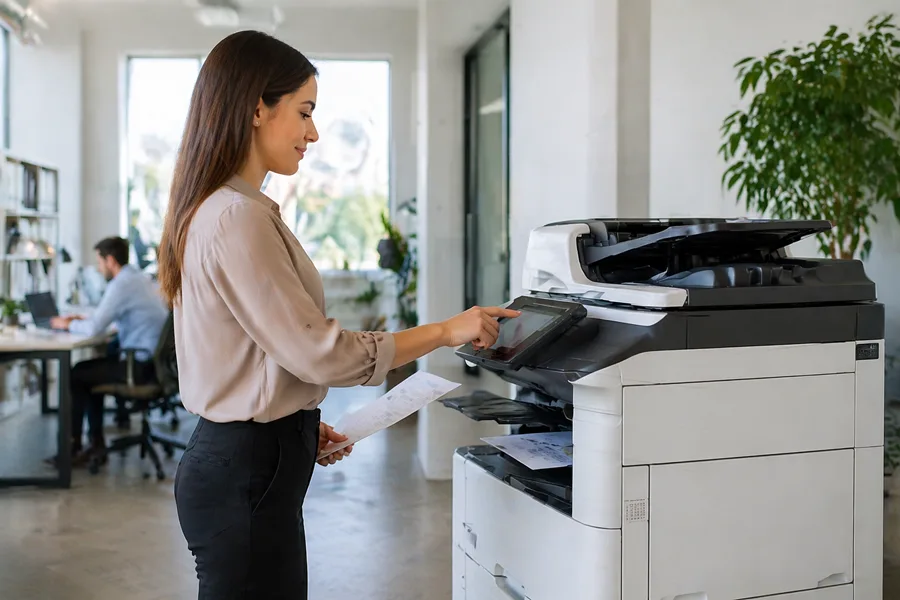
Your office copier is acting slow. Or maybe it jams every few jobs. Perhaps it’s been down for repair twice this month and it’s only mid February. You keep thinking about whether you should just keep patching it up or finally bite the bullet and replace it.
This is a decision we help businesses in Titusville, Melbourne, and Cocoa Beach make all the time. There’s usually one moment when a business owner realizes their old copier has become a productivity problem rather than a productivity tool. Our job is to help you recognize that moment before your downtime gets worse.
Here Are the Five Clear Signs It’s Time to Move On
1It Breaks More Than Once a Month
If you’re calling for service more than once a month, your copier has crossed from “occasional maintenance” into “persistent reliability problem” territory. Each service call takes time, costs money, and creates downtime while you wait for the technician.
When we evaluate whether a copier should be replaced, frequent breakdowns are one of the most telling indicators. A machine that requires service more than once monthly is essentially announcing that it’s nearing the end of its functional life. The bearing are wearing, components are failing more often, and you’re looking at a pattern of problems rather than an isolated issue.
Real example: A Melbourne office had their copier serviced four times in three months, spending over $800 in service calls. When we ran the numbers, they were actually throwing away money by keeping the machine. A new lease would have cost less than the repairs and given them a reliable machine.
2Repair Costs Are Climbing Toward $3,000 Per Year
Keep track of your annual repair and maintenance spending. When the total starts approaching $3,000 per year, you’ve reached the crossover point where replacement starts making financial sense.
Here’s the logic: a decent copier lease for a small to midsize office typically costs between $200 and $400 per month. If you’re spending $250 per month in repairs, you’re essentially leasing a broken copier that requires constant fixes. For the same money, you could have a new machine with warranty coverage and predictable costs.
The kicker is that old copiers don’t get more reliable as they age. Your repair costs will likely keep climbing. You’re not at a plateau, you’re on an upward trajectory.
3It’s Seven Years Old or Older
Copiers have a natural lifespan. Most machines begin showing significant decline after five to seven years of regular use. By year eight, you’re definitely in borrowed time.
Age matters because manufacturers stop releasing firmware updates for older models, parts become harder to source, and the technology simply gets outpaced. Your seven year old copier is also missing modern security features, cloud integration, mobile printing, and energy efficiency improvements that newer models offer.
In the Titusville area, we often find businesses using equipment that’s 8 to 10 years old. These machines are expensive to maintain, unreliable, and actually costing money compared to what a modern lease would provide.
4Error Messages Keep Appearing and Downtime Is Getting Worse
If you’re seeing persistent error codes, the copier is down for an hour or more each week, or people are working around the device by going to print shops or using personal equipment, you have a real business problem.
Downtime isn’t just an inconvenience. It’s a productivity killer. Employees can’t print contracts, proposals, or documents they need. Deadlines slip. Customer service suffers. You might not have a line item in your budget for “lost productivity due to copier downtime,” but that cost is very real.
A business in Cocoa Beach was dealing with a copier that was down about 2 to 3 hours per week. They thought it was just annoying, not realizing it was costing them roughly $500 to $1,000 per month in lost productivity. When we showed them the real impact, replacing the copier became obviously the right choice.
5It Can’t Do What You Need It To Do Anymore
Your business needs have evolved, but your copier is stuck in 2016. Maybe you need mobile printing so people can print from their phones. Maybe you need scanning directly to cloud storage or integration with your document management system. Maybe you need finishing capabilities like stapling and booklet making.
If your copier lacks features you need and there’s no way to add them, that’s a replacement decision that’s already been made. You’re just waiting to acknowledge it.
Businesses in the Melbourne area that handle a lot of client presentations sometimes realize their old copier can’t produce color output fast enough or doesn’t support the finishing options they need. Rather than spending time and money trying to work around these limitations, replacement is simply the better path.
Don’t Wait Until It Fails Completely

One of the mistakes we see businesses make is waiting until their copier completely fails before deciding to replace it. That emergency situation leads to poor decisions made under pressure and often higher costs.
If you’re seeing signs that replacement is coming, plan for it. Start looking at options now rather than being forced into a hasty decision when your copier dies mid week and you have urgent printing needs.
What Happens When You Replace It
When you’re ready to replace your copier, you have several options. You can buy new equipment outright, but for most businesses, a managed lease is the smarter choice. A lease gives you newer equipment every few years, includes all maintenance and support, and provides predictable monthly costs.
Make sure your new equipment includes security features like data encryption, firmware auto updates, and secure data wiping. Your copier should be as secure as your computers.
And handle your old equipment responsibly. Never donate or sell it without ensuring the hard drive is properly destroyed or securely wiped. The data on that machine could become a compliance violation or security liability if it falls into the wrong hands.
Frequently Asked Questions
How long should an office copier last before needing replacement?
Most office copiers have a useful life of 5 to 8 years before repair costs and downtime become significant issues. Some equipment lasts longer, but by year 7 or 8, you're usually dealing with regular service calls and increased maintenance expenses. Age combined with other factors like error frequency and repair costs determines when replacement makes sense.
Is it better to buy a new copier or lease when mine needs replacing?
For most businesses, leasing is more cost effective than buying. When you lease, you get regular maintenance, supply management, warranty coverage, and the ability to upgrade every few years. Buying requires you to handle all maintenance and repairs yourself. Leasing typically costs less over time and eliminates unexpected repair expenses.
What are typical repair costs for old copiers?
A single repair for an older copier typically costs between $150 and $500 depending on what breaks. Component replacements can cost $1,000 or more. If your copier needs service multiple times per year and is more than 5 or 6 years old, replacement usually costs less than continuing to repair it.
How much downtime is acceptable for office equipment?
Zero downtime is ideal, but 4 to 8 hours per month might be acceptable depending on your workflow. If your copier is down for more than that regularly, it's costing you productivity and employee frustration. Frequent downtime is a clear sign you need a newer, more reliable machine.
Can I upgrade just the software or features on my old copier?
Some copiers can receive software updates, but hardware limitations often prevent major feature upgrades. If your old copier doesn't support features you need (like mobile printing, cloud integration, or advanced security), replacement is usually the only option. Newer equipment offers functionality that older machines simply can't provide.
What should we do with our old copier after we replace it?
Never donate or sell an old copier without proper data destruction. The hard drive contains copies of every document that's been through the machine. Work with your copier provider or a certified IT disposal service to ensure the hard drive is securely wiped or physically destroyed before the device leaves your office.
Ready to Find the Right Copier Solution?
Smart Technologies of Florida has served Central Florida businesses since 1999. Call us at (386) 252-2292 for a free, no-obligation quote, or request one online. Business Transformation Agency.
Smart Technologies of Florida | 771 Fentress Blvd Suite 10, Daytona Beach, FL 32114 | (386) 252-2292 | smarttechfl.com
Related Posts
— Short Term Copier Rental vs. Long Term Lease: Which Makes Sense for Your Situation?
— Your Office Copier Is a Security Risk: What Most Businesses in Daytona Beach and Orlando Don’t Realize