Your Office Copier Is a Security Risk: What Most Businesses in Daytona Beach and Orlando Don’t Realize

April 30, 2026
 333 views
 0 comments
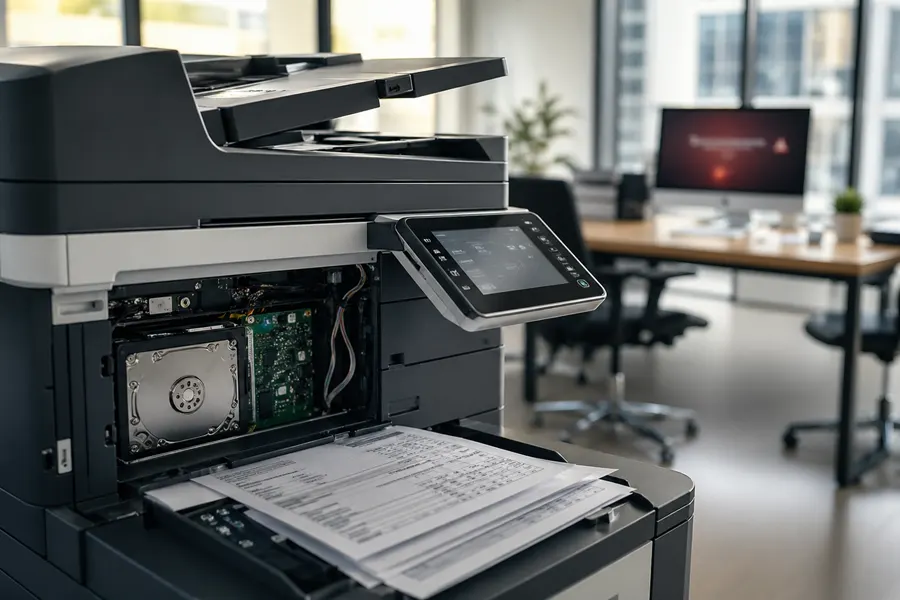
Here’s something that keeps us up at night at Smart Technologies: most business leaders have no idea that their office copier is basically a small computer with a hard drive, network connection, and access to sensitive documents. If you’ve never really thought about copier security before, you’re not alone. But you should be thinking about it.
We work with businesses across Daytona Beach, Orlando, Ormond Beach, and Winter Park, and the security risks we see in office imaging equipment are real and often overlooked. A compromised copier isn’t just an inconvenience. It can expose client information, trade secrets, financial records, and personal data. Let’s talk about what’s really happening inside your copier and why it matters.
The Hard Drive Problem Nobody’s Talking About
Modern multifunction printers (MFPs) aren’t just copiers anymore. They’re networked devices with substantial hard drives that store copies of everything that passes through them. Every document you scan, copy, or print gets saved to that drive.
Think about what goes through your office copier in a single week: tax returns, employment agreements, medical records, financial statements, client proposals, payroll information. All of it is sitting on that hard drive.
Here’s the scary part: when you hit delete or clear a job, the data isn’t really gone. It’s hidden, but it can be recovered with the right tools. And when you eventually replace that copier? If you simply hand it off to a reseller or recycler without proper data destruction, all those files are still accessible.
We’ve seen businesses lose thousands of dollars and their reputation because they didn’t properly dispose of an old copier. Someone recovered the hard drive, accessed client files, and sold the information. This isn’t theoretical. It happens regularly.
Network Vulnerabilities That Expose Everything
Your copier is connected to your network. It’s talking to your computers, your servers, and potentially your cloud services. But here’s the thing: many businesses don’t secure that connection properly.
A modern copier should have:
- Encryption for all network communications
- Strong authentication (not just default passwords)
- Regular firmware updates
- Network segmentation to limit what the device can access
Without these protections, your copier becomes a backdoor into your network. An attacker could intercept documents being scanned, install malware, or use the device as a stepping stone to reach more valuable systems.
We’ve worked with businesses in Orlando and the surrounding areas that discovered their copier firmware hadn’t been updated in years. That’s like leaving your front door unlocked because you never thought to put in a new lock.
Firmware Exploits: The Forgotten Vulnerability
Copier manufacturers regularly discover and patch security vulnerabilities in their firmware. But many businesses never update their devices. They set them up, use them for years, and never even think about firmware updates.
Hackers know this. They actively exploit known vulnerabilities in older copier firmware because they know many businesses haven’t patched them. A firmware exploit could give an attacker access to stored documents, the ability to intercept new documents, or even the ability to modify documents before they’re printed.
When we assess copier security for clients in Daytona Beach and surrounding areas, outdated firmware is one of the most common issues we find. It’s an easy fix, but only if you know it’s a problem.
Document Interception During Transmission
When someone scans a document to email, sends it to cloud storage, or uses the copier’s network scanning features, that document is traveling across your network. Without proper encryption, it can be intercepted.
This is especially risky for businesses that handle sensitive information. If your copier isn’t encrypting the data while it transmits, a technically savvy person on your network (or someone who’s breached your network) could capture that information.
We recommend that any copier scanning to email or cloud services use TLS encryption or equivalent security. Most modern devices support this, but you need to make sure it’s actually enabled.
The Audit and Compliance Problem
If your business operates under compliance requirements like HIPAA, GDPR, or PCI-DSS, you need to demonstrate that you’re protecting sensitive data. An unsecured copier is a compliance violation waiting to happen.
Regulators don’t care that your copier is “just a printer.” If it handles regulated data, it needs to meet security standards. Many businesses in Winter Park, Ormond Beach, and other parts of Central Florida have discovered compliance gaps because they weren’t properly managing their copier security.
What You Should Do Right Now
Find out what copiers you have, when they were last updated, what data they’re storing, and how they’re connected to your network.
Work with your copier provider to apply the latest firmware patches. This should be done regularly, not just once.
Don’t leave your copier with manufacturer default passwords. Set strong, unique credentials and limit who has access.
Make sure all network communications are encrypted, especially for scanning to email and cloud services.
When it’s time to replace a copier, work with a provider that properly destroys the hard drive or securely wipes the data.
How a Managed Copier Lease Protects Your Business
This is where a professional managed copier lease becomes valuable. Instead of worrying about security yourself, you partner with a provider who handles it.
A good copier lease includes:
- Regular firmware updates applied automatically
- Security monitoring and vulnerability assessments
- Proper device configuration with security best practices
- Guaranteed secure data destruction when equipment is replaced
- Compliance support for regulated industries
At Smart Technologies of Florida, we’ve been helping businesses manage technology security for over 25 years. We understand the risks because we see them every day. When you lease from us, you get a partner who’s responsible for keeping your copier secure, not just functional.
Your copier is touching some of your most sensitive information. It deserves the same security attention as your computers and servers. Don’t wait for a breach to discover this was an issue.
Frequently Asked Questions
Can a copier really store sensitive documents after they're printed?
Yes. Modern copiers and multifunction printers have built-in hard drives that store every document scanned or copied. These files can remain on the drive even after deletion and may be recoverable by someone with technical knowledge. When a copier reaches end-of-life, the hard drive still contains all that stored data unless it's properly wiped or destroyed.
What happens if someone gains network access to our office copier?
An attacker with network access could intercept documents being scanned or printed, change firmware to install malware, access stored files on the device, or use the copier as an entry point to your broader network. This is why network security for copiers is just as important as security for computers and servers.
How do outdated copier firmware create security vulnerabilities?
Older copier firmware often has known security weaknesses that hackers can exploit. Manufacturers regularly release firmware updates to patch these holes, but many businesses don't update their devices. An outdated copier is like leaving a door unlocked in your office.
Are documents vulnerable during the scanning process?
Absolutely. If your copier isn't using encrypted connections, documents could be intercepted as they're transmitted over your network. This is especially concerning when scanning to email or sending documents to cloud storage. Weak encryption or unencrypted connections make interception possible.
How does a managed copier lease help reduce security risks?
A professional managed lease typically includes regular firmware updates, security monitoring, proper data destruction when devices are replaced, and compliance with industry standards. Leasing providers handle security maintenance so you don't have to worry about staying current with patches and best practices.
What should we do with our old copier before getting rid of it?
Never donate or sell an old copier without wiping the hard drive first. The data is still there and can be recovered. Work with your copier provider to ensure proper data destruction, or have the drive physically destroyed if possible. This is critical for protecting your business and your clients' information.
Ready to Find the Right Copier Solution?
Smart Technologies of Florida has served Central Florida businesses since 1999. Call us at (386) 252-2292 for a free, no-obligation quote, or request one online. Business Transformation Agency.
Smart Technologies of Florida | 771 Fentress Blvd Suite 10, Daytona Beach, FL 32114 | (386) 252-2292 | smarttechfl.com
Related Posts
— Short Term Copier Rental vs. Long Term Lease: Which Makes Sense for Your Situation?

— The True Cost of Printing: Why Your Orlando Area Office Is Probably Spending More Than You Think