How to Find a Reliable Commercial Printer Near You (2026 Guide)

April 3, 2026
 1926 views
 0 comments
How to Find a Reliable Commercial Printer Near You (2026 Guide)
Your complete roadmap to choosing the right commercial printing partner for your business, whether you need brochures, banners, or high-volume production runs.
The Basics
Why Choosing the Right Commercial Printer Still Matters in 2026
You might think print is dying. It is not. The global commercial printing market hit roughly $594 billion in 2026, according to Mordor Intelligence, and packaging alone accounts for 38% of the total. Print still drives real results for businesses relying on marketing collateral, product packaging, signage, and direct mail.
But here is the catch. Not every printer can deliver what your business actually needs. Some shops specialize in large-format banners while others focus on short-run booklets. Some promise next-day turnaround and then miss the deadline. And a surprisingly large number of businesses overspend on printing simply because they never shopped around or asked the right questions.
So how do you cut through the noise and find a commercial printer who is genuinely reliable? This guide covers exactly how to do it. We will walk you through every step, from defining your requirements to evaluating quotes, so you can make a confident decision and stop wasting money on subpar print jobs.
Step One
Define Your Commercial Printing Needs First
Before you Google “commercial printer near me,” take ten minutes to write down your actual requirements. This one step will save you hours of frustration later. And it will prevent you from ending up with a vendor who is a poor fit.
Questions You Need to Answer
- What are you printing? Brochures, business cards, banners, packaging, direct mail pieces, or large-format signage all require different equipment and expertise.
- What volume do you need? A shop excelling at 500-piece runs might struggle with a 50,000-piece order. The reverse is also true.
- What is your turnaround requirement? Rush jobs cost more. If you can plan ahead, you will get better pricing and better quality.
- Do you need finishing services? Think binding, laminating, die-cutting, foil stamping, or UV coating. Not every printer offers these in-house.
- What file formats will you provide? Most commercial printers prefer press-ready PDFs, but some can work with native design files from Adobe InDesign or Illustrator.
- What is your budget? Be realistic. The cheapest quote rarely delivers the best results, but do not overpay either.
Once you have clear answers, you will be able to quickly filter out printers unable to meet your needs. This alone puts you ahead of most buyers.
Research
How to Research Commercial Printers in Your Area
Now you know what you need, so it is time to build a shortlist. Here are the most effective ways to find commercial printers near you.
Online Search and Reviews
Start with a Google search for “commercial printer” plus your city or county. Pay close attention to Google Business Profile reviews, Yelp ratings, and any industry-specific review sites. Look for printers with at least a 4-star rating and more than 20 reviews. A handful of five-star reviews could be from friends and family; a larger sample tells a more honest story.
Ask for Referrals
Talk to other business owners in your network. Which printers do they use? Have they ever had a bad experience? Personal referrals remain one of the most reliable ways to find quality vendors, especially in tight-knit Central Florida business communities like Daytona Beach, Orlando, and Jacksonville.
Industry Associations
Organizations like the Printing Industries of America maintain directories of certified commercial printers. Members typically adhere to quality standards and invest in ongoing training.
Trade Shows and Local Events
Florida hosts several business expos and trade shows each year where you can meet printing vendors face to face, see sample work, and compare capabilities in a single visit. This kind of hands-on evaluation is hard to replicate online.
Average annual printing cost per employee for U.S. businesses, totaling roughly $60 per month per person
Evaluation
What to Look for When Evaluating a Commercial Printer
You have your shortlist. Now comes the part most businesses skip: a proper evaluation. Do not just grab the lowest quote. Dig deeper.
Equipment and Technology
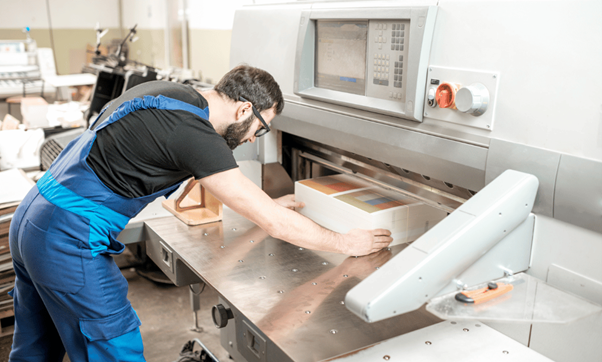
Ask what presses they run. Modern digital presses (like HP Indigo or Xerox iGen) deliver exceptional quality on short runs. Offset presses (Heidelberg, Komori) are still the gold standard for large-volume jobs. A shop with both digital and offset capabilities gives you the most flexibility.
AI-powered monitoring is becoming standard in 2026. Printers equipped with predictive maintenance tools experience less downtime, which means fewer missed deadlines for you.
Quality Samples
Always request printed samples. Look at color consistency, paper stock quality, sharpness of text and images, and finishing quality. If the printer cannot produce impressive samples, they will not produce impressive work for you.
Customer Service and Communication
Pay attention to how quickly they respond to your initial inquiry. Do they ask thoughtful questions about your project? Are they willing to walk you through options? A printer that is hard to reach before you are a customer will be even harder to reach after.
Turnaround Time and Reliability
Ask about average turnaround times and what happens when something goes wrong. Do they have a contingency plan for equipment failures? Can they handle rush jobs without sacrificing quality? These are fair questions, and any reputable printer will answer them without hesitation.
Pricing
Understanding Commercial Printing Costs in 2026
Printing costs vary widely based on volume, paper stock, color, finishing, and turnaround time. Here is a general breakdown to help you set realistic expectations.
| Print Type | Typical Cost Range | Best For |
|---|---|---|
| Business Cards (500) | $25 to $150 | Networking, brand identity |
| Brochures (1,000 tri-fold) | $150 to $600 | Marketing, trade shows |
| Flyers (1,000 full color) | $100 to $400 | Promotions, events |
| Banners (3×6 vinyl) | $40 to $120 each | Storefront signage, events |
| Booklets (500, 16-page) | $500 to $2,000 | Catalogs, menus, guides |
| Direct Mail (5,000 postcards) | $300 to $1,200 | Targeted marketing campaigns |
| Large Format Posters (24×36) | $15 to $75 each | Retail displays, presentations |
Keep in mind, these are ballpark figures. Your actual costs will depend on paper weight, coating, quantity, and whether you need any specialty finishing. Always get at least three quotes before committing.
Hidden Costs to Watch For
- Setup fees: Some printers charge per-job setup fees, adding $50 to $200 to smaller orders.
- Proofing charges: Hard-copy proofs (as opposed to digital proofs) often cost extra.
- Rush fees: Expect a 25% to 50% surcharge for expedited turnaround.
- Shipping and delivery: Local pickup is usually free, but delivery charges vary.
- File preparation: If your files are not print-ready, the printer may charge for prepress work.
Global commercial printing market value in 2026, with packaging representing 38% of total revenue
Comparison
Digital Printing vs. Offset Printing: Which Do You Need?
This is one of the most common questions businesses ask. The answer depends on your project specifics.
| Factor | Digital Printing | Offset Printing |
|---|---|---|
| Best for volumes | Under 1,000 copies | 1,000+ copies |
| Setup cost | Low or none | Higher (plate creation) |
| Cost per unit (high volume) | Higher | Lower |
| Color accuracy | Very good | Excellent (Pantone matching) |
| Turnaround | Same-day to 2 days | 3-7 business days |
| Variable data (personalization) | Yes | No |
| Paper options | Good range | Widest range |
For most small and mid-size businesses in Central Florida, digital printing covers 80% of typical needs. But if you are running a 10,000-piece direct mail campaign or need exact Pantone color matching for brand materials, offset is still the way to go. A good commercial printer will help you decide which method makes the most sense for each job.
Managed Print
Why More Florida Businesses Are Switching to Managed Print Services
Here is something worth considering. Instead of finding a one-off commercial printer every time you need something printed, you could partner with a managed print services (MPS) provider. The MPS market is growing fast, reaching $54.4 billion in 2026 according to Mordor Intelligence, and there is a good reason for the growth.
Managed print services bundle your printing needs into a single, predictable monthly cost. Your provider handles equipment, supplies, maintenance, and even workflow optimization. According to Gartner, businesses that adopt MPS typically reduce printing costs by 20-30%.
Benefits of Managed Print for Your Business
- Predictable costs: No more surprise toner bills or emergency repair invoices.
- Less waste: MPS providers optimize your print environment, reducing unnecessary output by 10-15%.
- Better security: Around 58% of enterprises adopt MPS partly for improved document security features like secure print release and audit trails.
- Proactive maintenance: AI-powered monitoring catches problems before they cause downtime.
- Environmental impact: Optimized printing means less paper waste, less energy consumption, and a smaller carbon footprint.
For businesses printing more than a few thousand pages per month, MPS almost always makes financial sense. And you still get access to commercial-quality output without managing the complexity yourself.
Technology Trends
Commercial Printing Technology Trends Shaping 2026
The printing industry is not standing still. If you are choosing a commercial printer today, make sure they are keeping up with these developments.
- AI-driven print management: Over 40% of commercial printers now incorporate AI solutions for predictive maintenance, color calibration, and workflow automation.
- Cloud-enabled printing: With hybrid work here to stay, cloud printing lets your team send jobs from anywhere. This is especially popular among Florida businesses with remote or multi-location staff.
- Variable data printing (VDP): Personalized direct mail and marketing materials perform significantly better than generic pieces. Digital presses make this easy and affordable.
- Sustainable printing practices: About 30% of commercial printers now offer eco-friendly options including recycled stocks, soy-based inks, and carbon-neutral production.
- Wide-format and specialty finishing: Demand for large-format graphics, textured finishes, and unique substrates continues to grow as businesses look for ways to stand out in physical spaces.
A printer that invests in current technology is a printer that will deliver better results and stay competitive on pricing. Ask about their equipment upgrades during your evaluation.
Your Partner
How Smart Technologies Helps Central Florida Businesses Print Smarter
Smart Technologies has been serving Florida businesses since 1999, and our approach to commercial printing goes beyond just putting ink on paper. Here is what sets us apart.
Managed Print Services
One monthly cost covers equipment, toner, maintenance, and support. No surprises.
Fleet Optimization
We analyze your current print environment and right-size your equipment to eliminate waste.
Document Security
Secure print release, user authentication, and full audit trails protect sensitive information.
Proactive Monitoring
AI-powered alerts catch issues before they cause downtime. We often fix problems before you notice them.
Cloud Print Solutions
Print from anywhere, on any device. Perfect for hybrid teams and multi-office setups across Florida.
Cost Transparency
Detailed reporting shows exactly where every dollar goes. No hidden fees, no inflated per-page rates.
Whether you need a single high-quality print run or a full managed print solution, Smart Technologies has the equipment and expertise to deliver. We work with businesses across Daytona Beach, Orlando, Jacksonville, and the entire Central Florida region.
Checklist
Your Commercial Printer Evaluation Checklist
Before you sign a contract or place your first order, run through this checklist. It will help you avoid the most common mistakes businesses make when choosing a printer.
- Verified at least three online reviews and one personal referral
- Confirmed they handle your specific print type (brochures, signage, packaging, etc.)
- Requested and reviewed physical print samples
- Asked about equipment age and recent technology investments
- Obtained quotes from at least three providers
- Confirmed turnaround time guarantees in writing
- Asked about hidden fees (setup, proofing, rush, delivery)
- Checked whether they offer both digital and offset capabilities
- Inquired about file format requirements and prepress support
- Discussed contingency plans for equipment failures or capacity issues
- Asked about sustainability options if that matters to your brand
- Evaluated customer service responsiveness during the quoting process
If a printer checks most of these boxes and feels like a good cultural fit for your business, you are probably in good shape. Trust your instincts on the communication side. A great printer that is hard to work with is not actually a great printer.
Typical cost reduction when businesses switch to managed print services, according to Gartner Group research
FAQ
Frequently Asked Questions About Commercial Printers
What is a commercial printer?
A commercial printer is a professional printing service or business that produces printed materials in bulk for other businesses. They use industrial-grade equipment like offset presses and high-end digital printers to create brochures, business cards, banners, packaging, and more at quality levels far beyond what office printers can achieve.
How much does commercial printing cost?
Costs range from $0.01 to $0.05 per page for high-volume jobs, while specialty items like brochures or banners cost more depending on size, paper stock, and finishing. A typical 1,000-piece tri-fold brochure order runs between $150 and $600. Always request itemized quotes from multiple vendors to compare accurately.
How do I find a commercial printer near me?
Start with a Google search including your city name, check review platforms like Yelp and Google Business Profile, ask fellow business owners for referrals, and look into directories from organizations like Printing Industries of America. In Central Florida, Smart Technologies offers both commercial printing and managed print services.
What is the difference between digital and offset printing?
Digital printing works best for runs under 1,000 copies, offers fast turnaround, and supports variable data printing. Offset printing uses plates and is more cost-effective for large runs (1,000+ copies) with superior color matching. Most modern commercial printers offer both options.
How long does commercial printing take?
Standard turnaround ranges from 3 to 7 business days for offset jobs and same-day to 2 days for digital printing. Rush services are available at most shops for a 25% to 50% surcharge. Always confirm timelines in writing before placing your order.
What file format should I send to a commercial printer?
Most commercial printers prefer press-ready PDF files (PDF/X-1a or PDF/X-4) with fonts embedded and images at 300 DPI or higher. Some also accept native files from Adobe InDesign, Illustrator, or Photoshop. Always ask your printer for their specific file requirements before submitting.
What are managed print services?
Managed print services (MPS) bundle your printing needs, including equipment, supplies, maintenance, and support, into one monthly cost. Providers like Smart Technologies monitor your print fleet, automate supply replenishment, and optimize your workflow. Businesses using MPS typically save 20-30% on total print costs.
Should I lease or buy a commercial printer?
Leasing makes sense for most businesses because it spreads the cost over time, includes maintenance, and allows you to upgrade equipment more frequently. Purchasing outright offers lower long-term costs but ties up capital and leaves you responsible for all maintenance and repairs. For businesses in the Daytona Beach area, Smart Technologies offers flexible leasing options with full support included.
What questions should I ask a commercial printer before hiring them?
Ask about their equipment and capabilities, turnaround times, pricing structure (including hidden fees), quality control processes, file format requirements, and how they handle mistakes or reprints. Also ask for references from businesses similar to yours. A confident, transparent printer will welcome these questions.
Are there eco-friendly commercial printing options?
Yes. About 30% of commercial printers now offer sustainable options, including recycled and FSC-certified papers, soy-based and vegetable-based inks, waterless printing technology, and carbon-neutral production programs. If sustainability matters to your brand, ask potential printers about their environmental certifications and green printing capabilities.
How do I know if a commercial printer is reliable?
Look for consistent positive reviews across multiple platforms, willingness to provide references, transparent pricing, a well-maintained facility, modern equipment, and responsive communication. A reliable printer will also be upfront about what they can and cannot do rather than overpromising.
Can a commercial printer handle my design work too?
Many commercial printers offer in-house graphic design services for an additional fee. This can be convenient if you do not have a dedicated designer, but keep in mind that a printer’s design team may not match the creativity of a standalone design agency. Ask to see design samples before committing to bundled services.
Ready to Simplify Your Business Printing?
Smart Technologies has helped Central Florida businesses streamline their printing since 1999. Whether you need a reliable commercial printer or a complete managed print solution, we will build a plan that fits your needs and budget.
Related Posts
— Lease Printer for Small Business: The Smart Choice for Budget and Efficiency
— What Is Business Process Automation? (2026 Guide)