The Real Cost of Print: What Your Office Documents Actually Cost (Updated 2026)

June 5, 2026
 1880 views
 0 comments
Managed Print Services
The Real Cost of Print: What Your Office Documents Actually Cost (Updated 2026)
Why the true cost of printing per page is far higher than toner and paper, and how managed print services bring it back under control.

The real cost of print averages 57.1 cents per office document once hidden expenses are counted, far beyond the 3 to 4 cents most budgets assume. Industry research from Gartner shows print can consume up to 3 percent of a company’s annual revenue. A managed print program typically trims total print spend by 20 to 35 percent in the first year.
Why It Matters
Budgets Are Hard. Print Budgets Are Harder.
Managing a budget is tough for any business, yet cost control often decides a company’s future growth. Dave Ramsey put it well: a budget is telling your money where to go instead of wondering where it went. As owners and managers, we carry a responsibility to be good stewards of company finances. The stakes reach beyond us, touching our employees and the communities we serve.
So here is an uncomfortable question. When did you last examine what printing really costs your office? Not the sticker price of the copier. Not the toner invoice. The full, true cost of every document your team produces.
Most businesses never look. One industry study found only 1 in 10 business owners know their total print spend. And the ones who do look usually stop at hardware and supplies, which turn out to be the smallest slice of the bill. Smart Technologies has audited print environments across Central Florida since 1999, and the pattern repeats in almost every office we visit: the visible costs get managed while the invisible ones quietly grow.
Why does this happen? Because print costs scatter across a dozen budget lines. Hardware sits in capital expenses. Toner hides in office supplies. Service calls land in IT. Storage eats facilities budget. Nobody owns the total, so nobody sees it. This article pulls those scattered pieces into one picture, with current 2026 benchmarks, a simple formula you can run on your own invoices, and an honest look at where managed print services help (and where they do not).
The Benchmark
What Does an Office Document Cost Per Page?
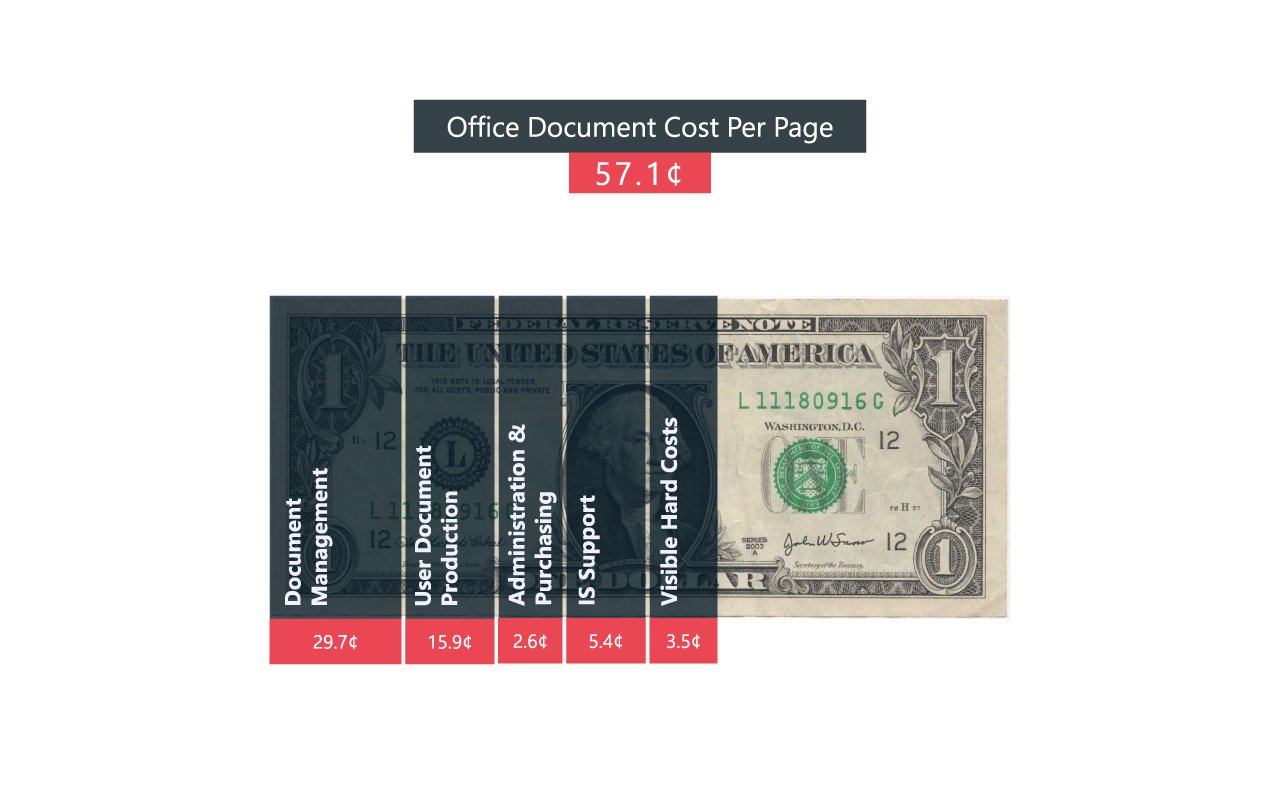
All Associates publishes a periodical EDAM Insight Guide analyzing data from 4,200 organizations to help businesses make better document budget decisions. Their finding? The average office document costs 57.1 cents per page when every contributing expense is counted.
Read it again. Not 4 cents. Not 10 cents. 57.1 cents.
Compare this with the figure most offices use. A typical black and white page runs 3 to 7 cents in toner and paper; a color page runs roughly 10 to 15 cents. Those numbers are accurate as far as they go. They just leave out about three quarters of the story.
Average true cost of a single office document, per the EDAM analysis of 4,200 organizations
The Breakdown
Where the 57.1 Cents Goes: Five Cost Layers
The EDAM model splits document cost into five categories. Here is how each layer adds up, from the costs you can see to the ones hiding deep in your operations.
Visible Hard Costs: 3.5¢
This is the layer everyone budgets for. Printer, copier, and scanner hardware plus supplies like toner and ink fall here, along with paper stock, on-site technician labor, power, and service charges. Notice something? The part of printing most offices obsess over represents barely 6 percent of the true total.
IT Infrastructure & User Support: 5.4¢
Devices need delivery, installation, and configuration. Print servers, IP ports, print management software, security controls, fonts and document elements, internal IT staff time, and third-party break-fix repairs all land in this layer. It already costs more than the hardware itself.
Administration, Purchasing & Facilities: 2.6¢
Someone has to manage the purchasing process, the storage closets, and the vendor relationships. This layer covers departmental staff time, real estate, inventory management, purchase order and invoice administration, contract management, and spend auditing. Overlooked? Almost always.
User Document Creation & Production: 15.9¢
The tools used to produce documents carry real cost: computers, operating systems, document creation software, output devices, PDF tools, email applications, and messaging systems. Anything involved in creating or delivering a document gets counted here, and it adds up fast.
Document Management: 29.7¢
The lion’s share. Physical and digital document storage, retrieval, compliance measures, auditing, process automation, postal mail, and courier services make up the single largest layer of document cost. Over half the total spend happens after the page leaves the tray. Our breakdown of printing costs most offices ignore digs deeper into this layer.
| Cost Layer | Cost Per Page | Share of Total |
|---|---|---|
| Visible hard costs (devices, toner, paper) | 3.5¢ | 6% |
| IT infrastructure & user support | 5.4¢ | 9% |
| Administration, purchasing & facilities | 2.6¢ | 5% |
| User document creation & production | 15.9¢ | 28% |
| Document management | 29.7¢ | 52% |
| Total true cost per document | 57.1¢ | 100% |
Source: All Associates EDAM Insight Guide. Percentages rounded.
Hidden Costs
The Print Expenses Nobody Puts in the Budget
Beyond the EDAM layers, several costs deserve their own line items because they hit hardest. And they rarely appear in any spreadsheet.
Your IT Team Becomes the Printer Help Desk
Gartner research found roughly half of all IT help desk calls are printer related. Some IT departments spend up to a quarter of their working hours repairing machines, fixing network interruptions, and troubleshooting print jobs. Every one of those hours is an hour not spent on security, infrastructure, or projects moving your business forward.
Share of IT help desk calls related to printer problems, according to Gartner research
Employees Print More Than You Think
The average office employee prints roughly 10,000 pages per year, costing around $725 per person annually. Multiply by your headcount. A 25-person office can easily spend $15,000 or more each year before counting a single hidden expense.
A Shocking Amount Goes Straight in the Trash
Industry studies estimate 17 to 45 percent of printed office pages end up discarded, many never picked up from the tray at all. Paper feels cheap at half a cent per sheet. Wasted by the ream, week after week, it stops feeling cheap.
Old Devices Drain Energy and Patience
A heavily used office copier can cost hundreds of dollars per year in electricity alone. Newer ENERGY STAR rated imaging equipment can run on a fraction of the power of older machines, which matters in Florida where cooling costs already punish every watt of waste heat.
Desktop Printers: The False Economy
A $100 desktop inkjet feels like a bargain next to a multifunction device. Then the ink bills arrive. Desktop inkjets can consume up to 300 percent more ink than a workgroup machine, pushing their per-page cost to 7 to 20 cents before counting their short lifespans and frequent replacement. Major manufacturers like HP publish page yield data for exactly this reason; the numbers favor shared, properly sized devices almost every time. Cheap up front rarely means cheap over three years.
Do The Math
How to Calculate Your Own Cost Per Page
Want a quick baseline before any formal assessment? Grab your last toner invoice and follow along.
The basic formula: (cartridge price divided by page yield) plus paper cost per sheet equals cost per page. Say you spent $50 on a cartridge rated for 1,000 pages, and your paper costs a penny per sheet. Your basic cost per page is 6 cents. For color devices, run the same division for each of the four cartridges, then add the totals together with the paper cost.
But remember what this number leaves out. No service costs. Zero IT time. Nothing for storage, energy, or waste. Industry analysts estimate businesses spend up to $9 managing their print environment for every $1 spent on actual printing. Your real number sits far above the napkin math.
| Print Type | Basic Cost Per Page | What It Excludes |
|---|---|---|
| Black & white (laser) | 3¢ to 7¢ | Service, IT support, energy, waste |
| Color (laser) | 10¢ to 15¢ | Service, IT support, energy, waste |
| Desktop inkjet | 7¢ to 20¢ | Frequent replacement, high ink cost |
| True all-in cost (EDAM) | 57.1¢ average | Nothing; this is the full picture |
One honest caveat: the EDAM average covers organizations of many sizes and industries. A lean 10-person Daytona Beach office with simple workflows will land below 57 cents; a compliance-heavy medical or legal practice can land above it. The point is not the exact figure. The point is your true cost runs several multiples of your supply cost, whatever your size. Curious how device choice shifts the math? Our guide on how much a printer costs compares purchase and operating prices across device classes.
Security
The Cost Layer Nobody Sees Coming: Print Security
Here is the layer missing from most cost conversations. Printers are computers; they hold data, sit on your network, and get ignored by most security plans. About half of reported data breaches involve paper documents at some stage, often as simple as a confidential page left sitting on a shared tray.
The federal Cybersecurity and Infrastructure Security Agency (CISA) urges businesses to treat networked devices, printers included, as part of their security perimeter. Pull printing, PIN release, and hard drive encryption on multifunction devices close the most common gaps. They also cut waste, since jobs nobody releases never print at all.
So print security pays for itself twice: once in breach risk avoided, and again in pages never wasted.
Consider the compliance angle as well. Florida medical practices handle HIPAA-covered records, law firms handle privileged documents, and financial offices handle account data; all three print constantly. A single misdirected print job containing protected information can trigger reporting obligations, client notifications, and remediation costs dwarfing years of toner spend. Device-level controls cost little. The incidents they prevent do not.
The Fix
What Managed Print Services Actually Save
Once you see the full 57.1 cents, the case for managing it becomes obvious. Managed print services (MPS) put your entire fleet, supply chain, and service workflow under one optimized program with predictable monthly costs.
The 2026 industry numbers are encouraging. A Gitnux roundup of managed print statistics reports 92 percent of MPS users saw a 20 to 35 percent reduction in total print spend within their first year. Other published results show consistent gains:
- Hardware cost reductions of 25 to 60 percent through fleet consolidation and right-sizing.
- Toner and supply savings near 40 percent annually with automated, usage-based replenishment.
- Energy consumption down roughly 30 percent after replacing aging devices with efficient models.
- Wasted output cut 10 to 15 percent with pull printing and sensible default settings.
- IT relief: service calls drop sharply when a dedicated provider handles maintenance and repairs.
Balanced view: MPS is not magic for everyone. A tiny office printing a few hundred pages monthly may do fine with a single well-chosen device and a supply subscription. The savings math strengthens as volume, device count, and compliance requirements grow. An honest provider tells you which side of the line you sit on; ask for the assessment data either way. If a copier upgrade is part of the conversation, review your copier lease agreement terms before signing anything.
What a Print Assessment Actually Involves
The process is less disruptive than most managers expect. A provider inventories every device on your network, pulls meter readings to establish real monthly volumes, and maps which departments print what. Two to four weeks of data usually reveals the pattern: a handful of overworked machines, several idle ones, and color output nobody approved. From there you get a proposed fleet design, projected per-page costs, and a savings estimate you can check against your own invoices. Good assessments cost nothing. And bad fleets rarely survive one.
Local Perspective
Print Costs in Central Florida: Daytona Beach to Orlando
National averages tell part of the story. Local conditions shape the rest. Central Florida businesses deal with a few realities their northern counterparts skip.
Humidity is the quiet one. Paper stored in non-climate-controlled spaces absorbs moisture, and damp paper jams more, wastes more, and wears feed rollers faster. Offices near the coast, from Daytona Beach down through New Smyrna, see this constantly. Storm season is the loud one: a single week of hurricane downtime can pile up service backlogs for offices relying on distant, out-of-market support providers.
And growth is the expensive one. The Orlando metro and the Volusia County corridor keep adding businesses, which means new offices buying first-generation print fleets without usage data, often oversizing hardware by thousands of dollars. Smart Technologies of Florida supports organizations across Daytona Beach, Ormond Beach, Port Orange, DeLand, and greater Orlando with local technicians who understand these conditions, backed by our managed IT solutions team when print issues turn out to be network issues.
Local response time carries a price tag too. When a national provider quotes next-business-day service for a down copier in Port Orange, the real cost is a day of staff working around a dead machine: scanning at the UPS Store, reprinting at a branch office, or simply waiting. A technician twenty minutes away changes the math entirely. For seasonal businesses along the I-4 corridor, where a slow week in September matters less than a busy one in March, service speed during peak months can outweigh a penny of difference in per-page rates.
How We Help
How Smart Technologies Helps You Cut the Real Cost of Print
FAQ
Real Cost of Print: Frequently Asked Questions
What is the real cost of printing per page?
Toner and paper alone run 3 to 7 cents for black and white and 10 to 15 cents for color. Once IT support, administration, document creation tools, and document management are counted, the EDAM analysis puts the average true cost at 57.1 cents per document.
How much does printing cost a business each year?
Gartner research estimates print spending can reach 3 percent of annual revenue. Per employee, expect roughly 10,000 printed pages and about $725 per year, so a 25-person office often spends $15,000 or more annually before hidden costs.
Why is my cost per page higher than the advertised rate?
Advertised rates count supplies only. Your actual rate absorbs service visits, IT troubleshooting time, energy, paper waste, and administrative overhead. Industry estimates suggest businesses spend up to $9 managing print for every $1 spent printing.
How do I calculate my printing cost per page?
Divide your cartridge price by its rated page yield, then add your paper cost per sheet. For color, repeat the division for each cartridge and sum the results. Treat the answer as a floor, since it excludes service and support costs.
Is color printing really three times more expensive?
Often, yes. Color pages typically cost 10 to 15 cents in supplies against 3 to 7 cents for black and white. A document containing even one color logo usually bills as a full color page, so default settings matter.
What share of printed documents gets wasted?
Studies place office print waste between 17 and 45 percent of all pages. Uncollected print jobs, duplicate copies, and single-sided defaults drive most of it. Pull printing and duplex defaults cut waste quickly.
What is managed print services?
Managed print services (MPS) is a program where one provider monitors, services, and supplies your entire print fleet for a predictable monthly cost. Good programs include usage reporting, automated toner delivery, preventive maintenance, and security configuration.
How much can managed print services save?
Published 2026 industry figures show most organizations cut total print spend 20 to 35 percent in the first year, with hardware savings of 25 to 60 percent through consolidation and supply savings near 40 percent.
Do small businesses benefit from MPS?
It depends on volume. Offices printing a few hundred pages monthly may not need a full program. Once you pass several thousand pages a month or manage multiple devices, the savings usually outweigh the program cost.
Are printers a real cybersecurity risk?
Yes. Networked printers store data and process credentials, and about half of reported breaches involve paper documents somewhere in the chain. CISA recommends including print devices in your security planning alongside servers and workstations.
Should I buy or lease my office printer?
Purchasing suits stable, low-volume needs; leasing spreads cost, includes service in most agreements, and simplifies upgrades. Review term length, overage rates, and end-of-term conditions before committing either way.
How does Florida humidity affect printing costs?
Moist paper jams more often, wastes supplies, and accelerates wear on rollers and fusers. Climate-controlled paper storage and regular preventive maintenance reduce these costs for Central Florida offices, especially near the coast.
What is the fastest way to cut printing costs this month?
Set duplex and black and white as fleet-wide defaults, enable PIN release on shared devices, and retire desktop inkjets where a workgroup device exists. These three changes alone commonly trim 10 to 20 percent of monthly print spend without buying anything new.
How often should a business review its print costs?
Annually at minimum, and quarterly for offices with changing headcount or seasonal volume. Device meter reports make the review painless once a baseline exists, and regular reviews catch cost creep before it compounds.
Business Transformation Agency
Find Out What Print Really Costs You
Three quarters of your document cost never shows up in the print budget. Smart Technologies will show you where it hides and how to claw it back, starting with a free assessment for Central Florida businesses.
GET A FREE QUOTE
(386) 252-2292
Related Posts

— Do Laser Printers Need Ink? Let’s Clear the Confusion
— What are Multifunction Printers? All About MFP Explained Simply